
Roofing CRM comparison: AerialReports, JobNimbus, AccuLynx, ProLine and Roofr
Prices, measurement report sources and exports side by side, checked against each vendor's public pages in October 2026.
AerialReports CRM, ProLine and Roofr publish their prices; JobNimbus and AccuLynx quote on request. AerialReports CRM lists Solo $89/mo, Pro $200/mo, Scale $599/mo and Enterprise $999/mo, and is the one in this group where the CRM and the aerial measurement reports come from the same company.
The table is limited to points we could check on each vendor's public pages. Where we could not, it says Not verified instead of guessing.
Five roofing CRMs, side by side
Competitor details below were checked against each vendor's public pricing and product pages in October 2026. Where we could not verify a point, the cell says so.
| AerialReports CRM | JobNimbus | AccuLynx | ProLine | Roofr | |
|---|---|---|---|---|---|
| Published prices | Yes. Free, $89, $200, $599, $999/mo. | No. Request pricing. | No. Get Pricing form or demo. | Yes. $497, $797, $1,697/mo (3 seats each). | Yes. Free Starter, $109, $249, $349/mo (monthly billing). |
| Measurement reports | Own reports since 2014, feeding the estimate. | Ordered from partners such as EagleView and HOVER. | Ordered from partners such as EagleView, SkyMeasure and HOVER. | Not listed on pricing page. | Own reports, $13 on paid plans, $19 on Starter. |
| Plan-based report discount | 10% to 35%, up to 40% custom. | Not verified. | Not verified. | Not applicable. | Not verified. |
| 3D roof model | 3D Quantum Viewer (Scale and above). | Via HOVER reports. | Via HOVER integration. | Not listed. | Not listed. |
| Calling and AI voice | SMS from Pro. Calling and AI voice coming soon. | Not verified. | Not verified. | Unlimited calling and texting; AI voice on Better. | SMS add-on $49/mo. |
| Xactimate / Symbility | Xactimate-formatted export and Symbility XML (Scale+). | Not verified. | Not verified. | Not verified. | Lists a Roofr Report with ESX. |
| Trial | 14-day free trial. | 14-day free trial, no card. | Via demo. | Not verified. | Free Starter plan. |
Compare one product in detail
AccuLynx alternative
Published prices versus a Get Pricing form, and own reports versus partner-ordered reports.
Read the comparisonJobNimbus alternative
Plan structure by user count, listed prices, and where each CRM gets its measurement reports.
Read the comparisonProLine alternative
ProLine's $497 to $1,697/mo plans with calling and AI voice, against aerial measurements and estimates.
Read the comparisonRoofr alternative
Two companies that make their own reports: price per report, ESX and the CRM around it.
Read the comparisonWhat AerialReports CRM does differently
Measurements and CRM from one company
AerialReports produces the roof reports and runs the CRM. A delivered report becomes quantities, a 3D roof model and a draft estimate on the job, without exporting from one tool and importing into another.
Prices you can read before talking to anyone
Every plan, seat count and add-on price is on the pricing page. Plan tier also sets a measurement discount from 10% (Solo) to 35% (Enterprise), applied at checkout.
Roof plus siding and exterior
Order roof reports and wall reports with windows, doors and trim, then build trade-grouped estimates for roofing, siding, gutters and other exterior scopes on one job record.
Proposals that sign online
Good/Better/Best proposals with e-signature (Pro and above), co-signer and contractor countersign, and an in-person signing mode for tablets.
Honest insurance exports
Symbility XML export and an Xactimate-formatted export you review and import. When a carrier needs a real Xactimate estimate, request one from the job and our team builds it in their own Xactimate license.
Supplier ordering
Order materials through ABC Supply and QXO from the job.
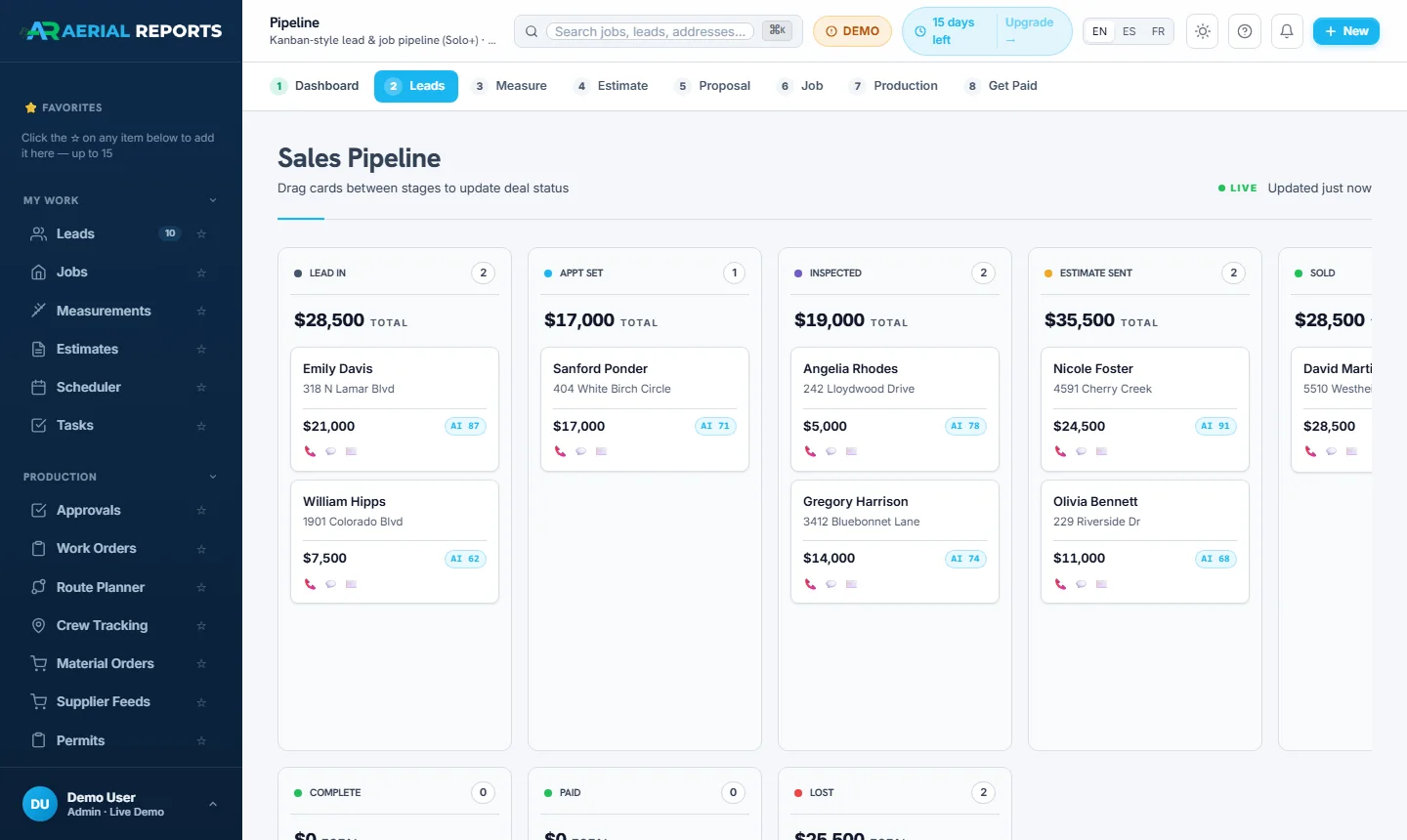
The lead pipeline in AerialReports CRM
How to choose
Pick on the work you do most. If you order many aerial reports, AerialReports CRM or Roofr put measurements and proposals in one place. If calling and AI voice agents are central, ProLine lists them. If you want an established general roofing CRM and are fine requesting a quote, JobNimbus and AccuLynx fit that.
Whichever you shortlist, run a trial on one real job from lead to signed proposal.
Frequently asked questions
What is the best roofing CRM?
Which roofing CRMs publish their prices?
Does AerialReports CRM generate Xactimate ESX files?
How much does AerialReports CRM cost?
Try it on a real job.
Start the 14-day free trial, or check the numbers first on the pricing page.